Play
The Play page is the main workspace for managing and playing media. It allows you to organise media into Banks, control playback on Layers, and preview content before it is loaded live.
Media can be adjusted in the Preview before being launched on a layer, and layer-specific parameters can be modified using the Layer Controls panel.
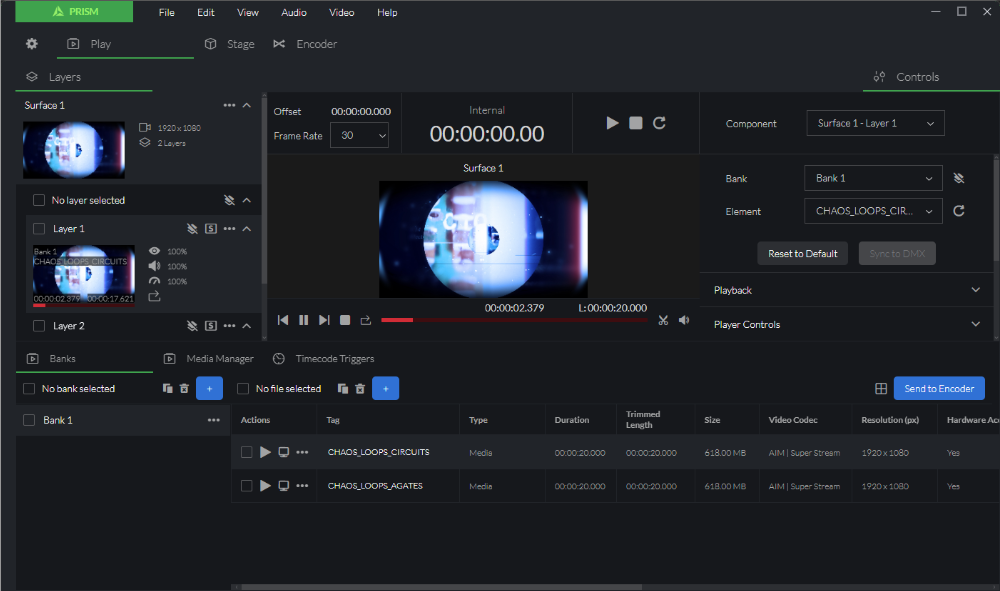
Layout Overview
The Play page is divided into several functional areas:
Left Panel
- Displays Surfaces and Layers previews.
- Provides a visual overview of all active layers and their content.
Center Area
- The Main Canvas shows a preview of the selected surface.
- Displays Timecode controls and the current timecode value when timecode is enabled.
Right Panel
- Contains Surfaces and Layers controls.
- Allows adjustment of layer parameters such as position, opacity, blending, and play modes.
Bottom Area
- Used to manage Banks and Bank Elements.
- Launch media onto layers.
- Access the Media Manager.
- Create and manage Timecode Triggers.